DMXリモート
| grandMA3 ユーザマニュアル » リモート入出力 » DMXリモート | Version 2.4 |
DMX Remotes タブでは、DMXチャンネルをリモート・トリガーとして利用します。卓自体をDMXソースとして使用できます。
DMX Remotes の設定では、以下のパラメータが使用されます。
- Address: DMX Address を設定します。
- Resolution: DMX Resolution を設定します。
- Trigger On Session Change:
Yes に設定すると、セッションのDMX計算が変更されるたびにターゲットがトリガーされます。
これには、例えば卓の起動や、セッションへの processing unit の追加が含まれます。これはDMXアドレスが Trigger On と Trigger Off の値範囲内にある場合に有効で、Trigger On が 0 のときは、外部DMX信号がなくてもターゲットがトリガーされます。Trigger On Session Change が無効な場合、DMX計算が変更されてもターゲットはトリガーされません。

|
ヒント |
| version 2.3 以前で保存されたショーファイルでは、Trigger On Session Change は Yes に設定されています。これは、これらのバージョンでの動作に一致します。新しいショーファイルでは、Trigger On Sesssion Change はデフォルトで無効です。 |
例
- DMX Remotes の設定を行うには、DMX Remotes をタップしてください。
DMX Remotes メニューが開きます。
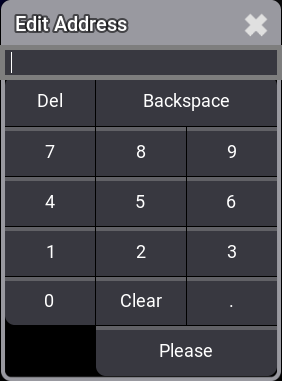
- DMXリモート入力がリッスンすべきDMXアドレスを設定するには、Address を右クリックまたは長押しします。
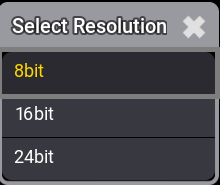
- DMXの分解能を設定するには、編集したいDMXリモートの Resolution セルを開きます。
|
|
ヒント |
| DMXリモートは、16ビットまたは24ビットのDMXチャンネルで制御できます。これにより、より正確な制御が可能になります。 |
|
|
ヒント |
| 制御するDMXデバイスで、16ビットや24ビットのチャンネルは、8ビットチャンネルの直後にパッチする必要があります。 |