DMXの優先順位
| grandMA3 ユーザマニュアル » DMX入出力 » DMXの優先順位 | Version 2.4 |
複数のDMXソースが同じパラメータの値に影響する場合があり、卓は競合する値を以下のソース優先順位で解決し、その後に出力モディファイアと選択オーバーライドが適用されます。
DMXデータソースの優先順位
- sACN、Art-Net、DMX In、PSN などの外部入力ソース。
- DMXテスター
- パークされた値
- Super 優先順位のプレイバック
- プログラマ(Freeze 有効)
- 標準のプレイバック優先順位
- Swap
- HTP
- Highest
- High
- LTP
- Low
- Lowest
- プログラマ(Freeze 無効)
マージ動作
1. HTP: 最も高いディマー値が優先されます。
2. LTP: 最新のアトリビュート値が優先されます。
出力修飾
1. Grand マスター
2. World マスター
3. Group マスター
選択オーバーライド
1. Highlight
2. Lowlight
3. Solo
各レイヤの説明
1. 外部入力ソース (sACN / Art-Net / PSN / DMX In)
外部入力である sACN、Art-Net、DMX In は、マージ方法に応じて最も高い優先順位になります。 その動作は Merge Mode と Input Priority によって決まります。
Merge Mode には、Prio、HTP、LowTP、Off があります。
入力の優先順位には、Super、Prog、Highest、High、LTP、Low、Lowest があります。
詳しくはDMXポートの設定 を参照してください。
PSNは継続的に位置データを送出し、リンクされた MArkers がパッチされているユニバースのマージ設定に応じて、高優先順位のポジション・ソースとして動作します。
詳しくは PSN を参照してください。
2. DMXテスター
卓上のほとんどすべてをオーバーライドします。トラブルシューティングやダイレクト・アドレス出力に使用します。DMXテスターはプログラマ、プレイバック、パークされた値より優先されます。
詳しくは、DMX Sheet の DMXテスター を参照してください。
これらの値は、コマンドラインまたは Tester Encoder Bar でDMXテスターがクリアされるまで保持されます。
3. パークされた値
Unpark が使用されるまでDMX値を強制的に固定します。主な用途としては、作業灯、反応しないチャンネルへの対処、ディマーの保護などがあります。
詳しくは、Park キーワード を参照してください。

|
ヒント |
| DMX出力がパークされていても、フィクスチャは Layout View では通常どおり反応します。 |
|
|
ヒント |
| Highlight、Lowlight、Solo は、パークされた値には影響しません。 |
4. Super 優先順位のプレイバック
他のプレイバックやプログラマをオーバーライドする特別な優先順位です。主な用途としては、ストロボ、バンプ、非常時のシーンなどがあります。
|
|
ヒント |
| Highlight、Lowlight、Solo は Super プレイバックより優先されます。これらは選択レベルで出力に作用してプレイバック値をオーバーライドできますが、パークされた値はオーバーライドされません。 |
5. プログラマ(Freeze 有効)
Freeze が有効な場合、プログラマは標準のLTPレイヤとして動作し、Super 優先順位のプレイバックによってオーバーライドされることがあります。これにより、再生されたほとんどのキューがプログラマ値をオーバーライドしないようになります。
Freeze については Freeze キーワード を参照してください。
6. 標準プレイバック
シーケンスのオプションです。詳しくは シーケンスの優先順位 を参照してください。
プレイバックの優先順位には以下の種類があります。
| 優先順位 | 代表的な使用例 |
| Swap | 一時的なバンプ/ソロ |
| Highest | プレイバックの中で最も高い優先順位 |
| HTP | ディマー・プレイバック |
| High | Higher LTP レイヤ |
| LTP | 標準プレイバック |
| Low | 背景用の照明状態 |
| Lowest | プレイバックの中で最も低い優先順位 |
7. プログラマ(Freeze 無効)
これはデフォルトのプログラマ動作です。通常のプレイバックとほぼ同じ優先順位です。アトリビュート・ロジックに応じて、キューでオーバーライドされることがあります。
マージ動作
1. HTP: 最も高いディマー値が優先されます。
2. LTP: 最新のアトリビュート値が優先されます。
HTPとLTP については シーケンスの優先順位 を参照してください。
出力修飾
1. Grand マスター
ショー全体に適用されるグローバルなインテンシティの制限です。Grand マスターの値は、データ計算後、DMX出力前に適用されます。詳しくは グランドマスター を参照してください。
2. World マスター
選択したワールドのディマー・マスターです。詳しくは World マスター を参照してください。
3. Group マスター
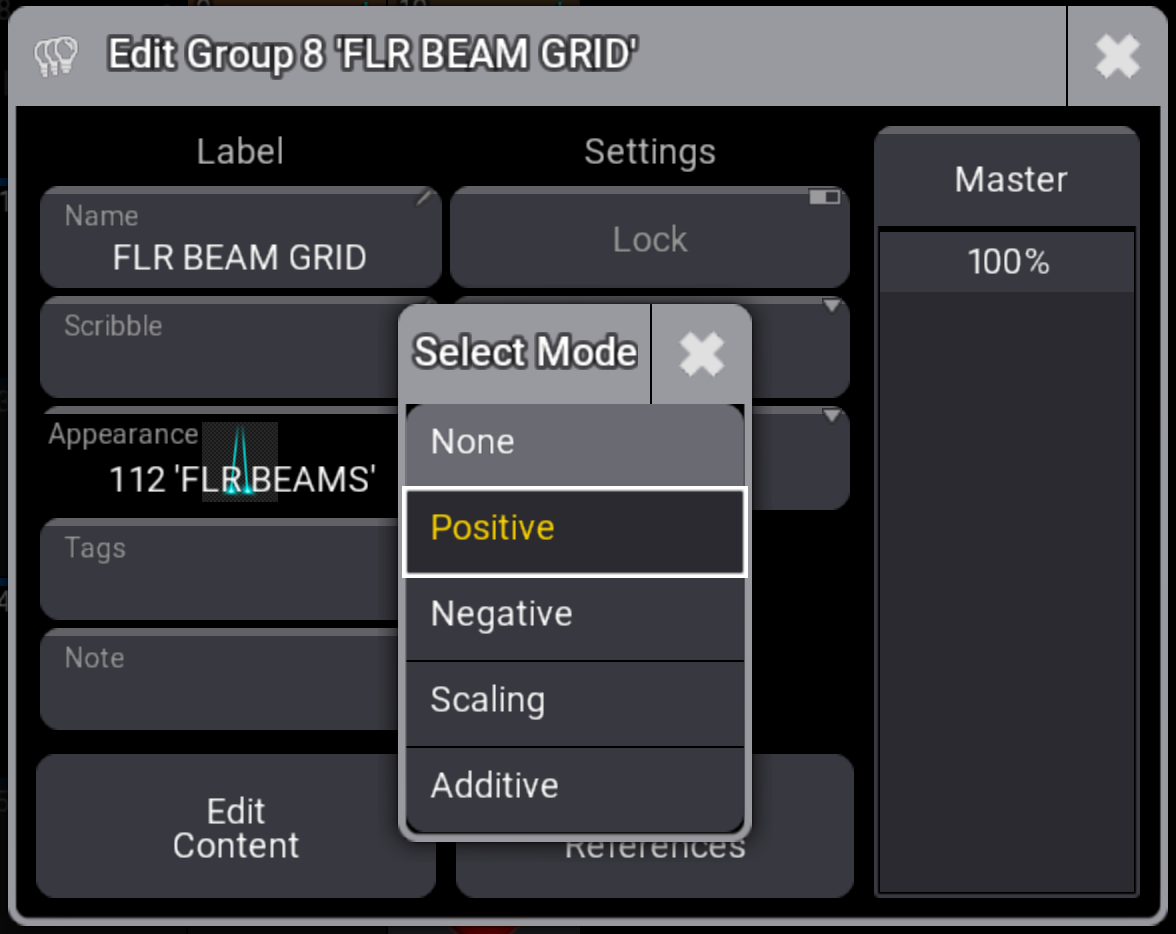
フィクスチャ・グループ用のディマー・マスターです。主な用途としては、バスキング、ゾーン制御、ブラックアウト・レイヤなどがあります。
Group マスター のモードは出力に影響することがあります。
|
|
ヒント |
| Negative、Positive、Scaling モードは Highlight より優先されます。 |
選択オーバーライド
選択オーバーライドは、選択したフィクスチャの出力を一時的に変更し、プレイバック値より優先されますが、パークされた値は上書きしません。
1. Highlight
2. Lowlight
3. Solo
詳しくは Highlight、Lowlight、Solo を参照してください。
|
|
ヒント |
| Highlight は、プログラマ内の他の値より優先されます。 |
|
|
ヒント |
| Solo はすべてのプレイバックより優先されます。 |