クイックスタート
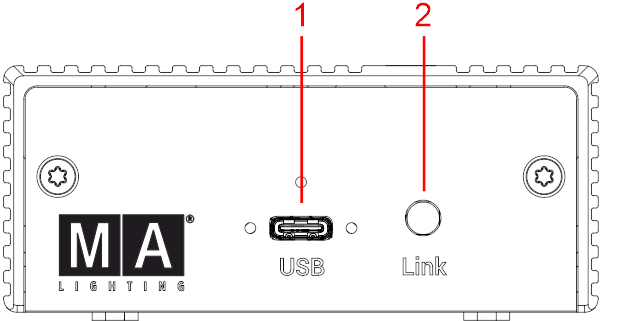
- USBポート (Type-C)
- Link LED
LEDステータス:
| LED | ステータス | トラブルシューティング |
|---|---|---|
| 常にオフ | 電源が供給されていません。デバイスに電源が入っていません。 | USB接続を確認し、PCまたは電源がオンになっていることを確認してください。 |
| 3回点滅 | デバイスの電源はオンですが、USBホストが検出されていません。 | USB-Cケーブルに損傷がないか確認してください。ワークステーションの電源がオンで、正常に動作していることを確認してください。 |
| ゆっくり点滅 |
デバイスの電源はオンで、USBホストが検出されています。 grandMA3 onPC に接続されていません。 |
ワークステーションで grandMA3 onPC ソフトウェアを起動します。 |
| 常に点灯 | grandMA3 onPC への接続が正常に確立されました。 | 対応は不要です。 |
| 速く点滅 |
grandMA3 onPC への接続は以前に確立されていましたが、現在は失われています。設定されている場合、DMX-Hold が有効になっていることがあります。 点滅はDMXデータの送信を示すものではありません。 |
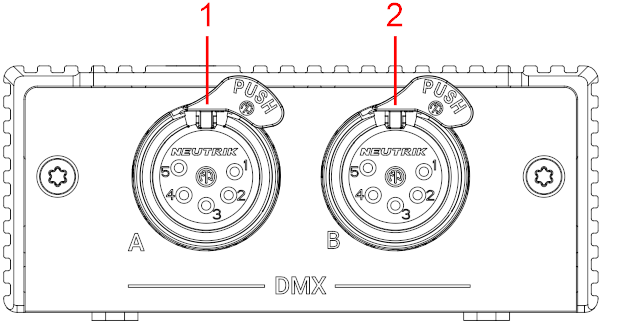
grandMA3 onPC ソフトウェアの状態を確認してください。USB接続とDMX設定を確認してください。詳しくは DMXポート を参照してください。 |
起動
- 機器を開梱してください。
- 梱包材や緩衝材を取り外します。
- grandMA3 onPC ソフトウェアがインストールされたPCに、USB-Cケーブルを介して grandMA3 onPC DMX-key を接続します。
- grandMA3 onPC DMX-key の電源をオフにするには、USB-Cケーブルを取り外してください。
- grandMA3 onPC ソフトウェアの最新バージョンをダウンロードするには、www.malighting.com にアクセスしてください。